Project write-up
Paperless Intake
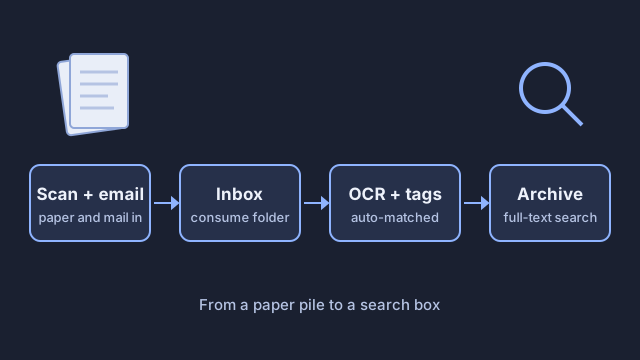
I replaced a paper pile and a folder of loose PDFs with one intake pipeline. Documents come in from the scanner or email, get read and tagged automatically, and end up in one searchable archive.
The problem
Household documents lived in two places: paper in a filing cabinet, and PDFs scattered across folders with no tags and no search. Finding one document meant checking both, by hand.
Constraints
- Budget: nearly free. I used a scanner and NAS I already had.
- Time: one weekend to build.
- Local only: documents and OCR stay on my own hardware, with no cloud service.
- Dependencies: Paperless-ngx in Docker on the NAS, a scanner that can save to a network folder, and a mailbox for email intake.
What I built
Before
- Paper arrives and goes on a pile, then eventually into the filing cabinet.
- Digital documents get saved to whatever folder seems right at the time.
- To find something, guess whether it's paper or digital, then search by hand.
After
- Paper: the scanner saves a PDF straight to the Paperless consume folder on the NAS.
- Email: Paperless checks a mailbox and pulls in attachments on its own.
- Read: Paperless-ngx runs OCR on every document and stores a searchable copy next to the original.
- Tag: automatic matching learns from documents I've already tagged and assigns the correspondent, document type, and tags to new ones.
- Find: search any word on the page, or filter by tag, sender, or date.
- Keep the paper: scanned originals go into one unsorted box as a backup. It never needs filing, because the archive is the index.
How I verified it
- Search spot check: I searched for words that appear on scanned documents. Every search found the right document.
- Tag check: I reviewed a batch of documents after automatic tagging and corrected the ones it got wrong, which also trains the matching for next time.
What broke / what I'd change
- Folder permissions. At first, Paperless couldn't work with files in the consume folder. The container ran as a different user than the share owner. I set the container's user and group IDs to match the share owner, and intake started working.
- Email login. Paperless couldn't sign in to the mailbox with the normal password. It needed an app password before email intake worked.
- What I'd change: I'd time the old and new process before switching over. I know finding documents is easier now, but I don't have before and after numbers to prove it. I'd also count tag accuracy on a fixed batch, so the next round of tuning has a baseline.